From prompt to frame, A quick review of Figma’s AI Agents.
Figma’s AI agent is in beta — here’s how I’m actually using it (and why the free window matters)
I’ve spent the last six months working on designs for a new app I’m working on. When I’m this far into design I feel like I’m backed into a corner. Any inspiration I do find just doesn’t seem to fit in well with what I’m designing. That is, until I gave the Figma AI agent beta a go.
I’ve shaved HOURS off my to-do list this week playing with Figma Agents.
Want that feeling of options again without burning an afternoon nudging frames? Here’s a throwaway demo in a blank file (not the hush-hush app) of how I’m using it.
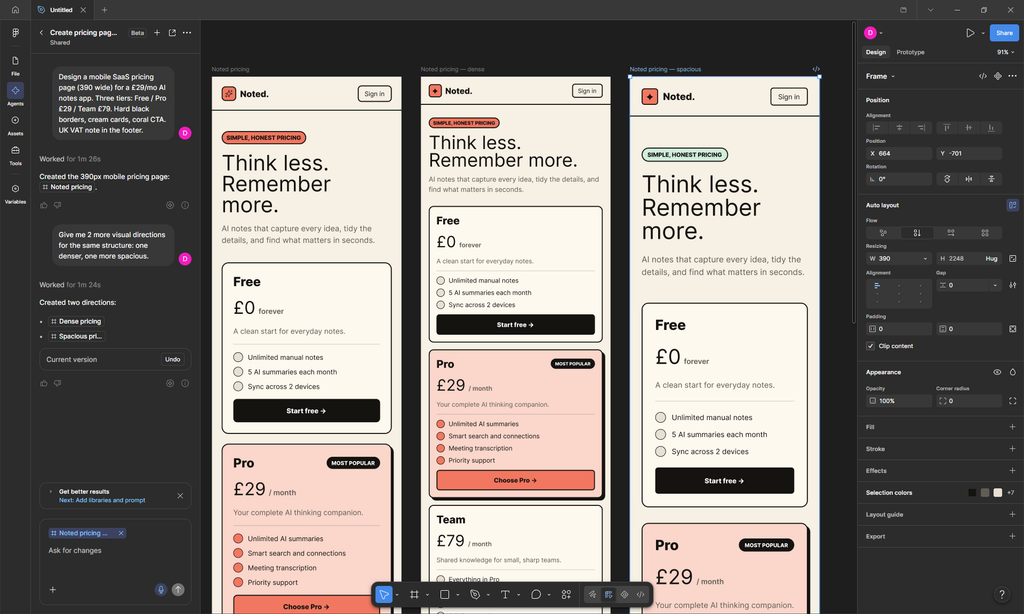
I asked the Agents panel for a 390-wide mobile pricing page for a fake “AI notes” app — cream cards, hard borders, coral CTAs, UK VAT in the footer. A short wait later I had a starting frame. One follow-up — “two more visual directions: denser and more spacious” — and I had three options on the canvas to compare.
That’s the useful bit for me as a one-person builder: less time stuck deciding where to start, more time picking a direction.
———
Figma’s design agent lives on the canvas / left rail. You talk to it in natural language: explore ideas, edit, bulk work, get feedback. It’s fine-tuned for Figma files, and you can run prompts in parallel.
It started rolling out on 20 May 2026. When it’s live for you, you’ll see the Agents icon and a clear Beta tag.
Eligibility depends on seat and plan (Full seats on Professional / Organisation / Enterprise get the broadest access; some seats are drafts-only; Starter / Education / Government are out). Check Figma’s Help Center rather than assuming you have it.
During beta, prompts don’t consume AI credits — but there are still monthly beta limits. At general availability, usage pulls from your AI credit pool. Figma has not confirmed a GA date yet (more on that below).
Sources:
https://www.figma.com/blog/the-figma-agent-is-here
———
How I’m using the Figma AI agent beta
Coming up with concepts and driving direction
This is where I felt like it had the most impact. The agent isn’t a random image generator bolted onto the canvas. It works inside Figma, and when you’ve got a library in play it starts to “get” how you design — components, spacing habits, as well as your overall user’s needs when you give it enough context.
I used it to spit out pricing concepts and variants fast. Not because every pixel was final — because I could see three directions and choose, instead of staring at an empty frame. If you’re collecting tools into a real stack later, that’s the kind of receipt we keep under Stacks (https://indieondeck.com/stacks/) — this post is just the agent workflow.
Shipping the fiddly bits
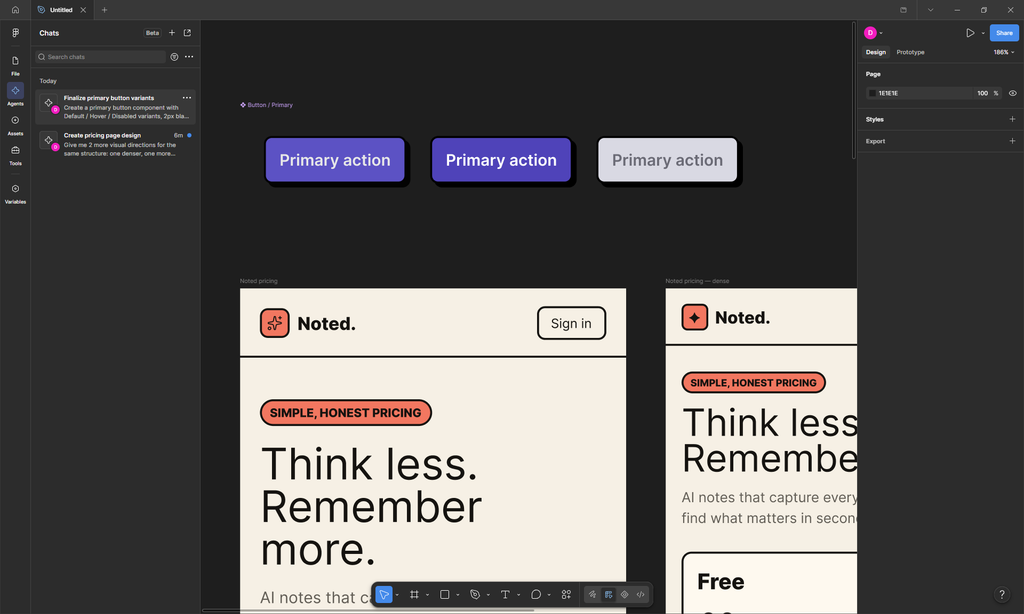
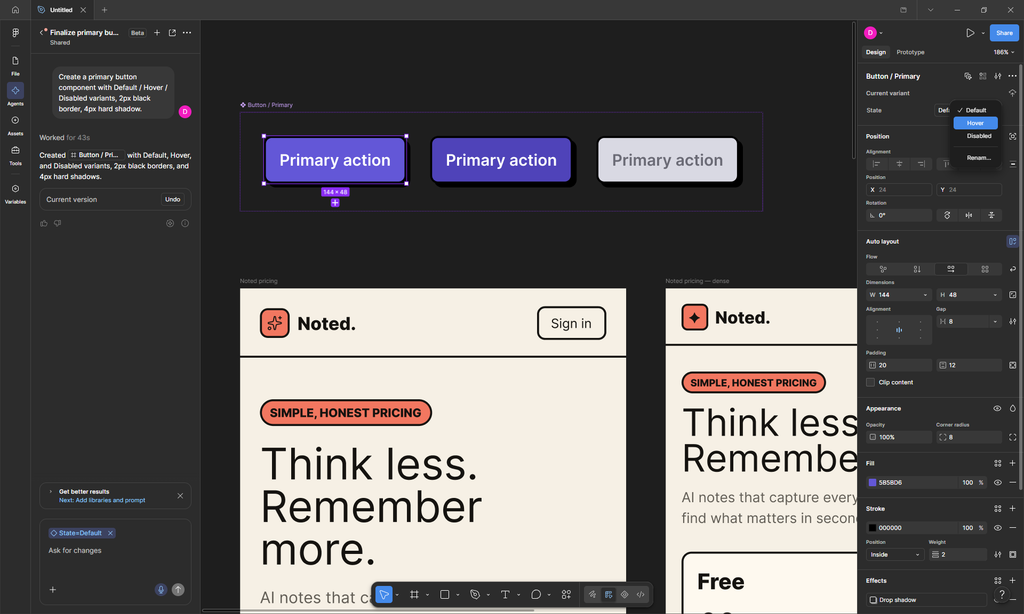
I also asked it to build a primary button component with Default / Hover / Disabled variants, 2px black border, 4px hard shadow. It came back as a real component set — states wired, styles applied — fast enough that I didn’t bother building the variants by hand. I have noticed that the agent would sometimes tell me that it couldn’t use the prototyping tools even though I have seen it do it multiple times in several of my files, but generally I’ve found it easy to get it to wire up repetitive tasks like finding components I forgot to wire up.
That’s the “ship” win for me: less time hand-building boilerplate so I can move on to the decisions that actually need a human.
[IMG] component_states.png
What’s annoying (and easy to fix)
Sometimes it drops a new screen or component on top of something that’s already there. Most of the time it places things sensibly. When it doesn’t, you just drag it. Not a deal-breaker — just don’t expect perfect layout manners every prompt.
Results are generally strong, especially when you’re prompting against a library. Screenshots here may still need a crop or zoom before publish.
———
What’s actually free right now (read this twice)
Two things are true at once:
1. In beta, prompts use 0 AI credits. Figma even shows you what the same prompt would cost later. On my throwaway runs I saw tooltips like “0 AI credits while in beta” with a post-beta estimate (e.g. 66 credits for a heavier pricing prompt, 22 for the button set).
2. Monthly beta limits still exist. Hit the cap and you’ll get an in-product message. Limits reset monthly and don’t eat your other AI credit limits.
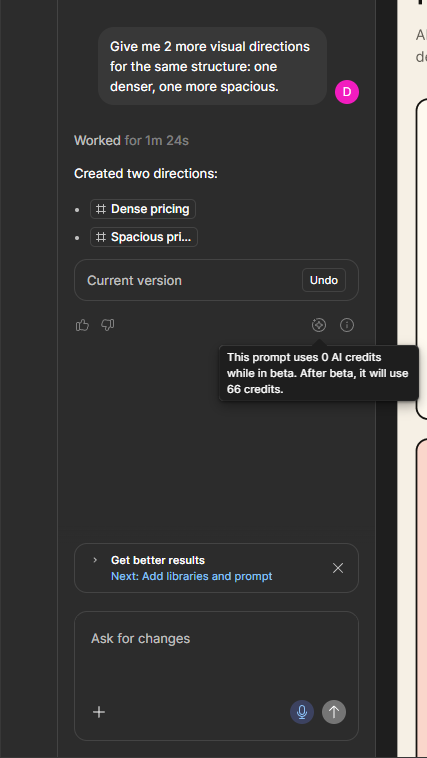
When does beta end? Figma hasn’t confirmed a general availability date. The AI credits FAQ says Weave tools and the agent in Figma Design are moving from open beta to GA “in a few weeks,” and they’ll update the article and warn before credit consumption starts. Until then: treat the free-of-credits window as temporary, not permanent.
Sources:
https://help.figma.com/hc/en-us/articles/42614902212887-AI-credit-updates-FAQ
———
Who should bother / who should skip
Worth a look if: you’re already in Figma Design, you’re eligible for the agent beta, and you want faster concepting and boilerplate without watching your credit balance during beta.
Skip or wait if: you’re on Starter / Education / no AI enabled; you only need Figma Make; or you’d rather wait until GA pricing is clear.
Agent ≠ Make. Agent is conversational design work on the canvas. Make turns designs into interactive prototypes / web. Different jobs. For the “how I actually run the week” stuff, that’s closer to Playbooks (https://indieondeck.com/playbooks/) than a product tour.
———
What I’m doing next
I’m using the free-of-credits window while it lasts — especially for concepting and small component work — and I’m keeping an eye on Figma’s FAQ for when credits start.
If the Agents icon is already in your sidebar: open a throwaway file, run one real prompt against your library, and see whether it saves you a round of staring at blank frames. That’s the test that matters.
Till next time!
If this post links to software we may use an affiliate link. We mark those. We do not invent usage numbers. Disclosure.
Discussion